The most easiest and quick method even for large table using the bcp:
|
1 |
bcp dbname.dbo.tablename out T:\temp\table5.txt -S localhost -T -c -t, -a 32768 |
if you use unicode add: -w

Just another Select of Ms SQL DBA site
The most easiest and quick method even for large table using the bcp:
|
1 |
bcp dbname.dbo.tablename out T:\temp\table5.txt -S localhost -T -c -t, -a 32768 |
if you use unicode add: -w
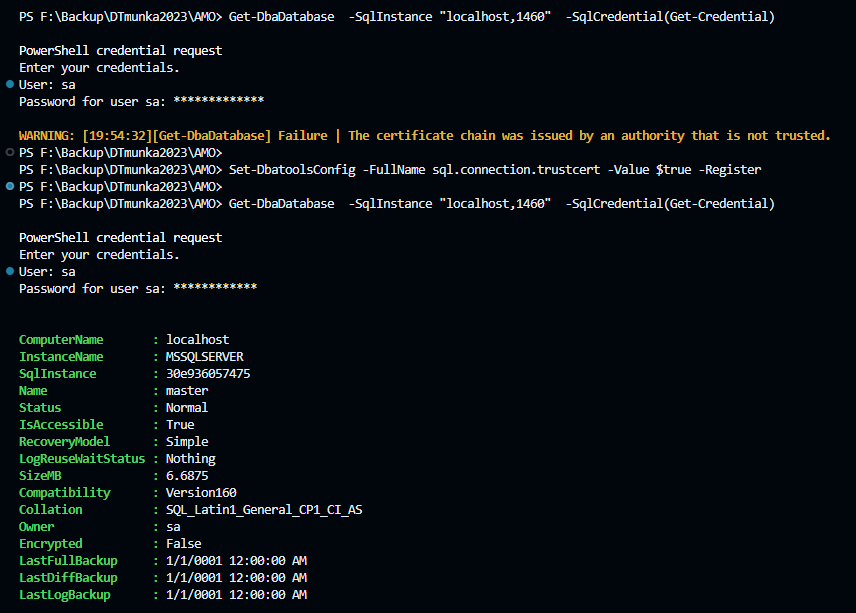
If you get the error:
Get-DbaDatabase] Failure | The certificate chain was issued by an authority that is not trusted.
You can set in dbatools:
|
1 |
Set-DbatoolsConfig -FullName sql.connection.trustcert -Value $true -Register |
or
|
1 2 3 4 5 |
# Set these defaults for all future sessions on this machine Set-DbatoolsInsecureConnection # Set defaults just for this session Set-DbatoolsInsecureConnection -SessionOnly |
Some usefull docker command in powershell windows :
Prerequisite: Visual Studio Code Remote Development Extension Pack
|
1 2 3 4 5 6 7 8 |
# 1. Build the infrastructur in github directory: docker-compose build # 2. Run the infrastructure docker-compose up # 3.When done, clean up the environement by running docker-compose down |
Commands in powershell (in the new empty project folder):
|
1 2 3 4 5 6 7 8 9 10 11 12 13 |
# download the code git clone https://github.com/docker/welcome-to-docker # enter to project folder cd .\welcome-to-docker\ # open it in Visual Studio Code code . # build the container docker build -t welcome-to-docker . # yo can start it in Docker Desktop |
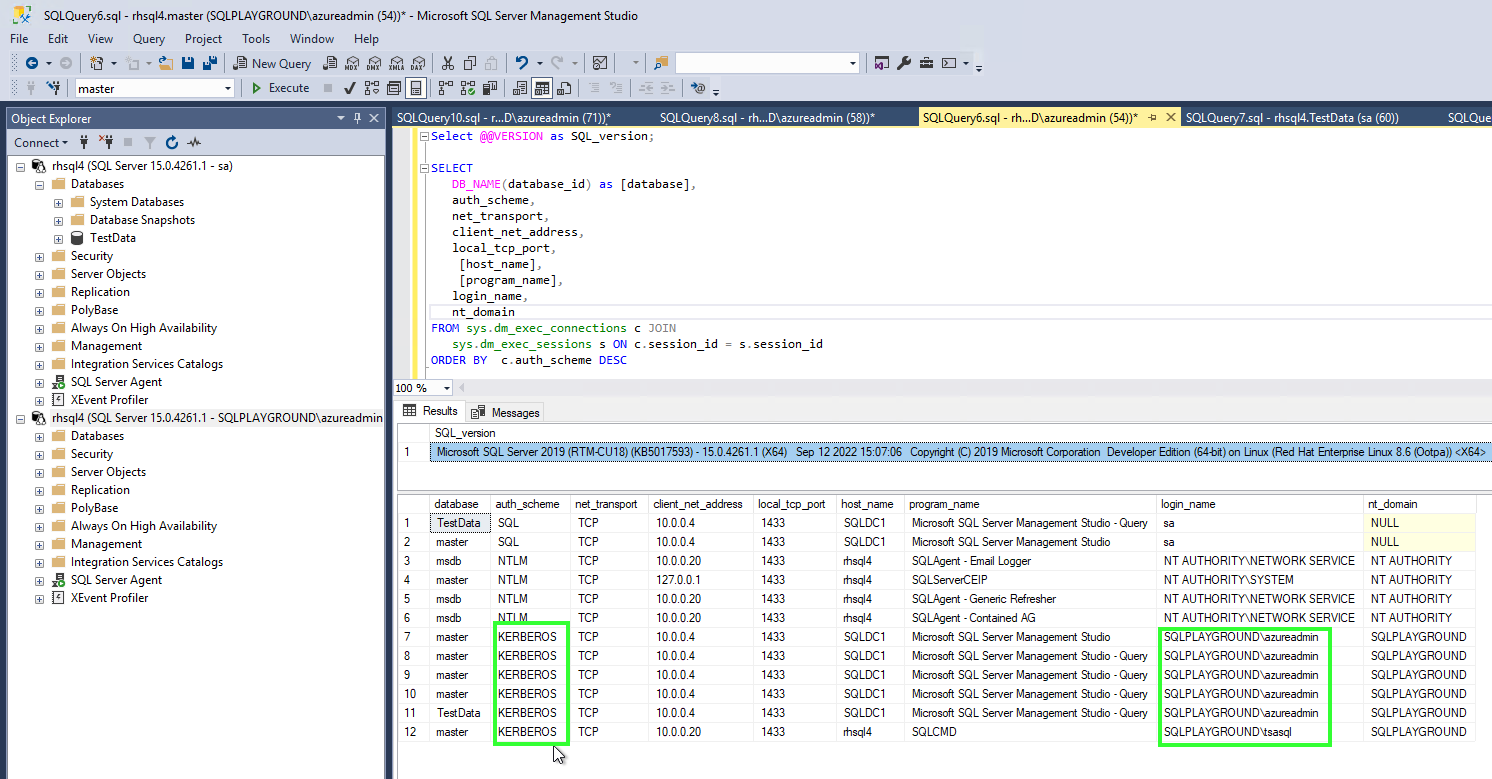
This is an SSMS screenshot where a SQL user and two (windows) domain users connected to SQL Server:
some hint if you want to deploy it:
– at first you have to join the linux server to the Active Directory
sudo realm join SQLPLAYGROUND.COM -U ‘azureadmin’ -v
– kinit and klist help you to check kerberos tickets
– you can use create -k /var/opt/mssql/secrets/mssql.keytab only in Ubuntu
– you have to use ktpass /princ MSSQLSvc/REDHATSQL2019.SQLPLAYGROUND.COM:1433@CONTOSO.COM /ptype KRB5_NT_PRINCIPAL /crypto aes256-sha1 /mapuser SQLPLAYGROUND\sqluser /out mssql.keytab -setpass -setupn /kvno /pass in Red-Hat linux
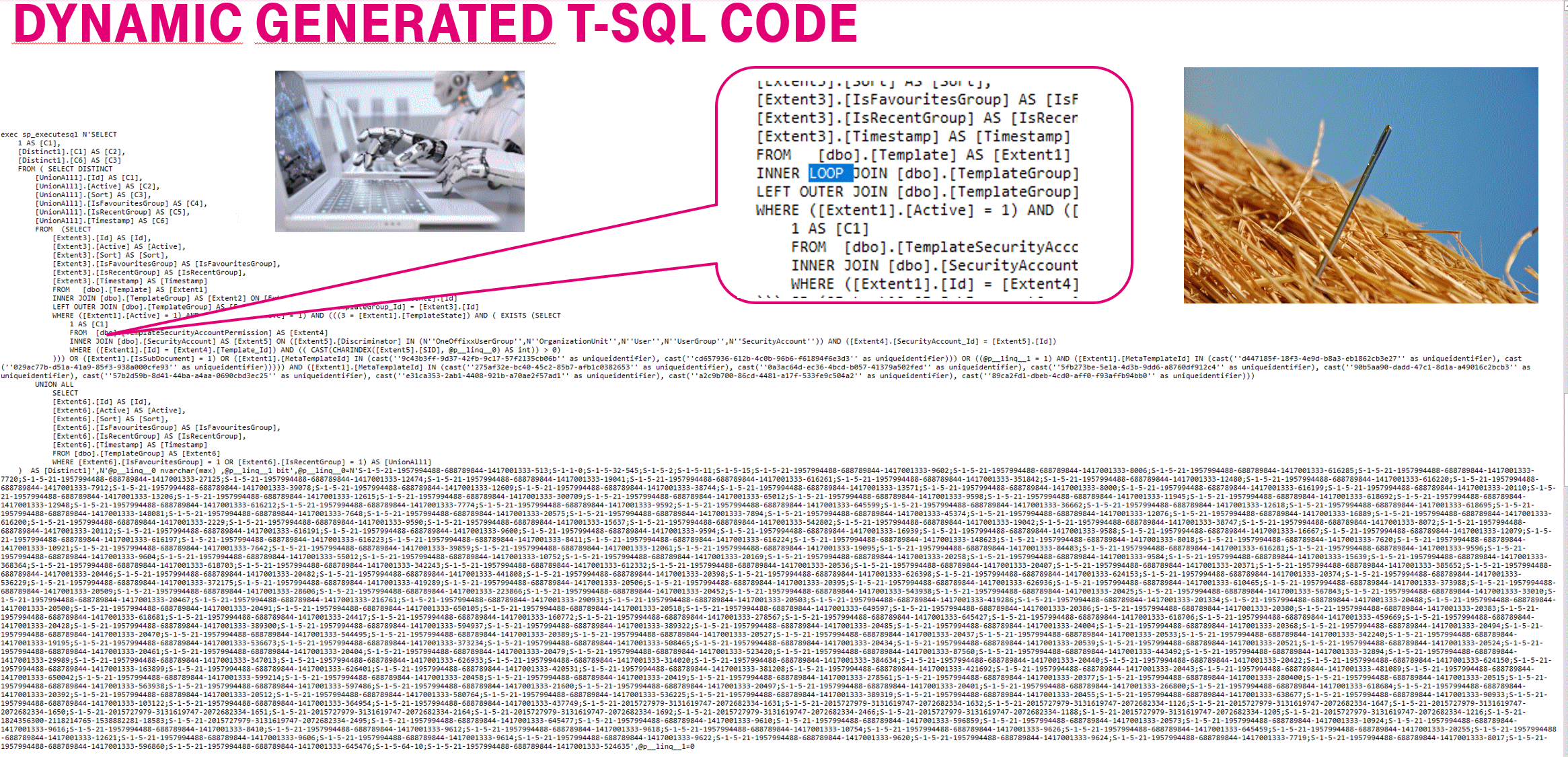
A poorly written query can code trouble if the SQL server cannot predict a good execution plan because of too many type conversation and varchar max parameters:
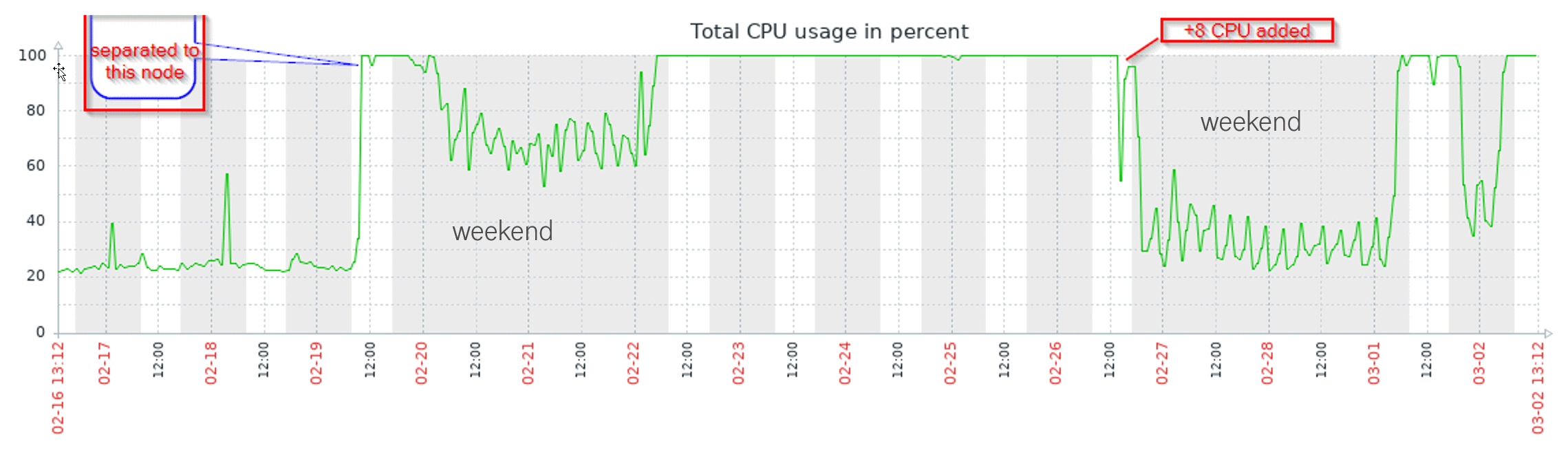
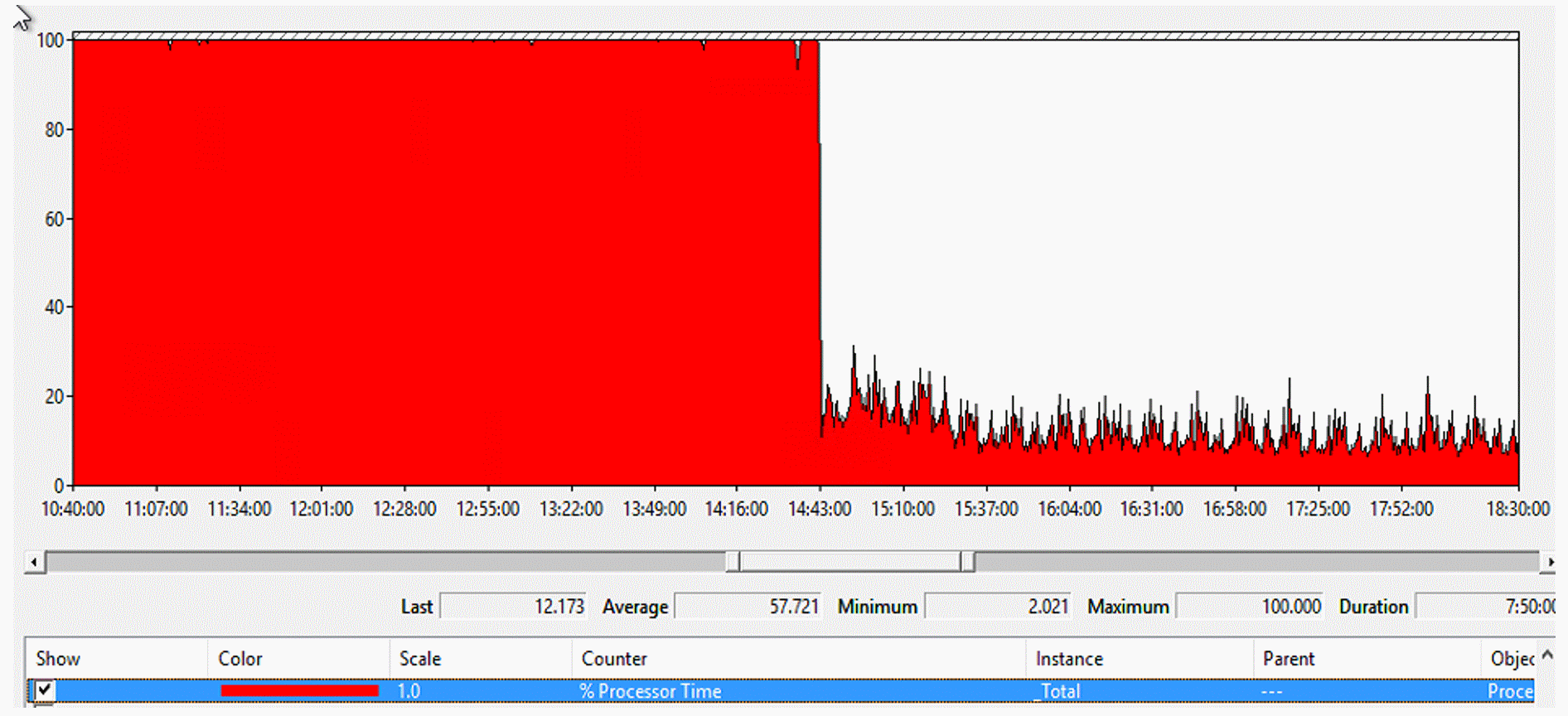
After changing the code
Do you have unused index? Do you have ineffective index? How many times was it used for select or update?
Is it used by scan , seeks or lookups?
Index usage statistics :
|
1 2 3 4 5 6 7 8 |
-- index usage statistics SELECT d.name AS DatabaseName, t.name AS TableName, i.name AS IndexName, ius.* FROM sys.dm_db_index_usage_stats ius JOIN sys.databases d ON d.database_id = ius.database_id JOIN sys.tables t ON t.object_id = ius.object_id JOIN sys.indexes i ON i.object_id = ius.object_id AND i.index_id = ius.index_id WHERE d.database_id = (DB_ID(N'DataBaseName')) and t.name='TablesName' -- Database Name and Table ORDER BY user_updates DESC |
You can start a stored procedure that is set to automatic execution runs every time an instance of SQL Server is started.
|
1 2 3 4 5 6 7 8 |
EXEC sp_procoption @ProcName = N'<procedure name>' , @OptionName = 'startup' /* The only value for option is startup. */ , @OptionValue = 'on'; /* (true or on) or off (false or off) */ EXEC sp_procoption @ProcName = N'<procedure name>' , @OptionName = 'startup' , @OptionValue = 'off'; |
Is there any autostart stored procedure on your SQL Server?
You can query:
|
1 2 3 |
SELECT ROUTINE_NAME FROM MASTER.INFORMATION_SCHEMA.ROUTINES WHERE OBJECTPROPERTY(OBJECT_ID(ROUTINE_NAME),'ExecIsStartup') = 1 |
There is a database in AG and you need to drop it and restore from backup (which is sometimes a transition from developer to prod )
You don’t need any prerequisite for cluster nodes and AG names.
The script find the instance in local windows server and find the db AG nodes and listener.
So finally you need the database name and the location of the backup folder which can be an Ola backup solution folder.
|
1 2 3 4 5 6 7 8 9 10 11 12 13 14 15 16 17 18 19 20 21 22 23 24 25 26 27 28 29 30 |
$db="AdventureWorks" $BackupDirectory= "\\backupserver01\mssql_bkp\SQLSERVER15\AdventureWorks" $SqlServersOnline = (Get-ClusterNode).name | Find-DbaInstance | Where-Object {$_.Availability -eq "Available" } #find AG: $AGGroup =Get-DbaAgDatabase -SqlInstance $SqlServersOnline[0] | Where-Object {$_.Name -eq $db} $SQLListener = Get-DbaAgListener -SqlInstance $SqlServersOnline[0] | Where-Object {$_.AvailabilityGroup -eq $AGGroup.AvailabilityGroup} # connect to listener to get primary and secondary $availabilityGroupReplicas = Get-DbaAgReplica -SqlInstance $SQLlistener.Name -AvailabilityGroup $AGGroup.AvailabilityGroup $PrimaryReplica = ($availabilityGroupReplicas | Where-Object role -eq 'Primary').Name $SecondaryReplica = ($availabilityGroupReplicas | Where-Object role -eq 'Secondary').Name $AvailabilityGroup = $AGGroup.AvailabilityGroup # remove db from AG-s Remove-DbaAgDatabase -SqlInstance $PrimaryReplica -AvailabilityGroup $AvailabilityGroup -Database $db Remove-DbaDatabase -SqlInstance $secondaryReplica -Database $db -Confirm:$false # check restore script with -OutputScriptOnly # Restore-DbaDatabase -SqlInstance $primaryReplica -DatabaseName $db -Path $BackupDirectory -WithReplace -MaintenanceSolution -OutputScriptOnly # usefull paratmeters if needed: -RestoreTime '2022-01-26 07:15:00' -WithReplace -OutputScriptOnly -MaintenanceSolution Restore-DbaDatabase -SqlInstance $primaryReplica -DatabaseName $db -Path $BackupDirectory -WithReplace -MaintenanceSolution # -OutputScriptOnly # check and set recovery model if needed if ( (Get-DbaDbRecoveryModel -SqlInstance $PrimaryReplica -Database $db).recoverymodel -eq "Simple") ` { Set-DbaDbRecoveryModel -SqlInstance $PrimaryReplica -Database $db -RecoveryModel Full ; Backup-DbaDatabase -SqlInstance $PrimaryReplica -Database $db -FilePath NUL } # add database to primary AG Add-DbaAgDatabase -SqlInstance $PrimaryReplica -AvailabilityGroup $AvailabilityGroup -Database $db -SeedingMode Automatic |
SQL server setup error with using setup.exe /CONFIGURATIONFILE=D:\Install\ConfigurationFile.ini
Error message:
Error result: -2054422506
Result facility code: 1420
Result error code: 22
Please check the ini file:
Reason:
; Setup will not display any user interface.
QUIET=”True”
; Setup will display progress only, without any user interaction.
QUIETSIMPLE=”False”
; Parameter that controls the user interface behavior. Valid values are Normal for the full UI,AutoAdvance for a simplied UI, and EnableUIOnServerCore for bypassing Server Core setup GUI block.
UIMODE=”Normal”
Possible Solution :
QUIET=”False”