Send email if performance monitor counter value average is high

Do you need an alert for CPU, for network?
Here is an example for one network card.
You can put in a ps1 file and run it from task scheduler.
You should set the email and SMTP addresses:

SQL AO AG failover in cluster group and check the synchronization status

Get info from Cluster:

Failover general example, you can use Invoke-DbaAgFailover for SQL server:

DBATools makes your life happy, you can find the SQL server instances and you can failover them.

To find  all of the SQL instances in a cluster server . To Check AG before and after the failover, and failover the SQL Server AO AG :


if you have to wait a lot for synchronization you can check how many servers are synchronized.


What is my default backup BUFFERCOUNT and MAXTRANSFERSIZE Data Transfer Options?

Error message: BackupIoRequest::ReportIoError: write failure on backup device \\filer\sharename\.. bak Operating system error 8(Not enough memory resources are available to process this command.).

It may you want a better performance for backup (less cpu and shorter backup time, so you can tune the BUFFERCOUNT  and MAXTRANSFERSIZE

https://docs.microsoft.com/en-us/sql/t-sql/statements/backup-transact-sql?view=sql-server-ver15
–Data Transfer Options BUFFERCOUNT = { buffercount | @buffercount_variable } | MAXTRANSFERSIZE = { maxtransfersize | @maxtransfersize_variable }

Books Online gives the following definition for these two options:

BUFFERCOUNT = { buffercount | @ buffercount_variable }

Specifies the total number of I/O buffers to be used for the backup operation. You can specify any positive integer; however, large numbers of buffers might cause “out of memory” errors because of inadequate virtual address space in the Sqlservr.exe process.

Based on the values that you provide or do not provide, SQL Server specifies the size contiguous buffers that it will use to perform the backup. This is of utmost importance in 32-bit environments as large amount of contiguous memory allocation can prove to be fatal to the non-Buffer Pool region of the SQL Virtual Address Space. This can cause your backups to fail. When SQLVDI is being used, this is of utmost importance because we cannot change the MAXTRANSFERSIZE after the VDI Configuration has been completed. The amount of contiguous virtual memory is determined by the number of backup devices and by the number of volumes on which the database files reside on.

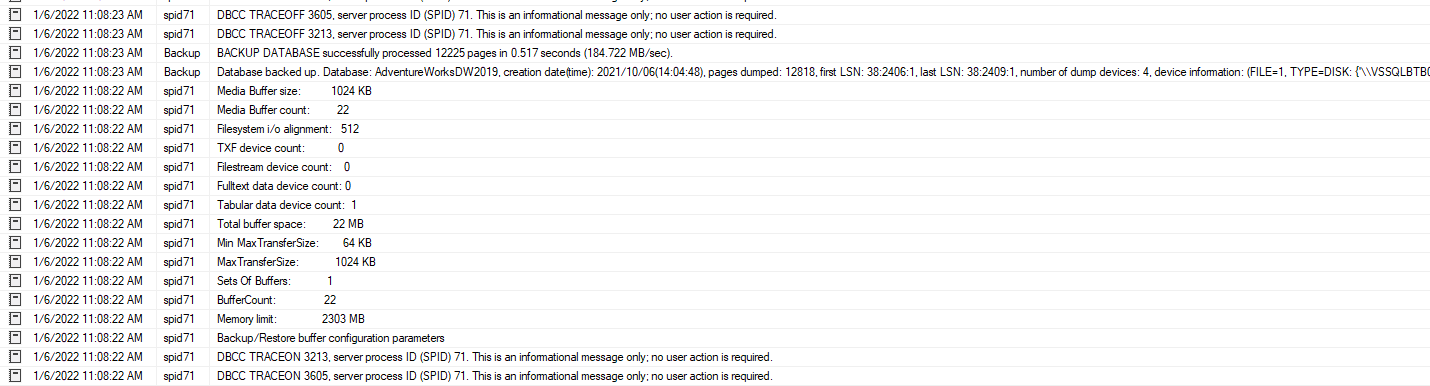
You can use Trace Flag 3213 to review your backup/restore configuration parameters while performing a backup/restore operation. I shall proceed to show you how specifying the incorrect BUFFERCOUNT values or not providing it can prove to be fatal.

So how to get the buffercount?

Sample result:

out of memory backup BUFFERCOUNT and MAXTRANSFERSIZE

Monitor the active session scheduled by SQL agent service

It is very common  that you should investigate what is going on the server at a certain time and you can not find any scheduled job. Yes, the application run a big job. If you want to see current processes, you can run:

If you want to log it, you can schedule for every 1-10 minutes (you have to set the @destination_table and @destination_database, and the table will be created at the first running time):


Get the subfolder sizes in a folder with PowerShell

List the subfolder sizes in a folder


Result sample:


Find old files in subfoders – older than 30 days with PowerShell

Find old files recursively with powershell script:


Find the oldest file:


DISTRIBUTED TRANSACTION: DTC in SQL server

There is two SQL servers and DTC is enabled both of them.

One SQL server is local and another one is a linked server named test.

Run a Distributed Transaction in SQL server for test purpose:

after running the T-SQL transaction you can check in the DTC report.


you can check the DTC connection and firewall settings:

DTC ping tool

In powershell:

If the remote server is another domain,  you will get an error:
New-CimSession : WinRM cannot process the request. The following error with errorcode 0x80090322 occurred while using Kerberos authentication: An unknown security error occurred.

In this case you can set: No Authentication Required.


DTC and Java

How to enable DTC in SQL server for Java:

– copy sqljdbc_xa.dll to sql server binn folder from the EXTRACTED (but not installed) jdbc driver
– enable xa transactions in component services > computerts > Distributed Transaction Coordinator > Local DTC (properties, security tab) Enable XA transactions
– restart sql server (all components to be sure)
– run script on master db. (xa_install.sql it is also in the jdbc driver, next to the .sql)
– the user that will perform distributed transactions must have the role “SqlJDBCXAUser” set on the MASTER db!

Windows Performance tools

  1. install WPT on the affected host. WPT is part of ADK. Or they can just download this archive – extract it on the server into C:\msdata folder. They should have at least 5Gb free space on that disk
  2. Run elevated CMD and execute:

#perf_counters

logman delete %computername%_IO

logman create counter %computername%_IO -c “\LogicalDisk(*)\*” “\Memory\*” “\Network Adapter(*)\*” “\Network Interface(*)\*” “\Paging File(*)\*” “\PhysicalDisk(*)\*” “\Process(*)\*” “\Processor Information(*)\*” -max 512 -f bincirc -si 00:00:01 -ow

logman start %computername%_IO

#etw_trace

C:\msdata\xperf -on PROC_THREAD+LOADER+PROFILE+INTERRUPT+DPC+FILENAME+FILE_IO+FILE_IO_INIT+FLT_IO_INIT+FLT_IO+FLT_FASTIO+FLT_IO_FAILURE+DISK_IO+DISK_IO_INIT -stackwalk Profile+FileCreate+FileCleanup+FileClose+FileRead+FileWrite+FileSetInformation+FileDelete+FileRename+FileDirEnum+FileFlush+FileQueryInformation+MiniFilterPreOpInit+MiniFilterPostOpInit+DiskReadInit+DiskWriteInit+DiskFlushInit -BufferSize 1024 -MinBuffers 256 -MaxBuffers 2048 -MaxFile 4096 -FileMode Circular


  1. In the folder C:\msdata create data_stop.cmd with following content:

logman stop %computername%_IO

C:\msdata\xperf -d C:\msdata\io.etl

  1. Then ask customer to find an event id 17883 in the application event log, do right click -> attach and “attach task to this event”, in action for the task point it to the script – C:\msdata\data_stop.cmd
  2. Also make sure following options set for the task:
    Run whehet user is logged on or not
    Runt with Hihgest privileges


Test it, write to the app event log:
Write-EventLog -LogName Application -EntryType Error -Source MSSQLSERVER -EventId 17883 -Message “TEST ERROR EVENT – PLEASE IGNORE IT.”


Test if they are running:

xperf -loggers “NT Kernel Logger”
or
logman query “NT Kernel Logger” -ets


If session exist – trace is running.